Reverse engineering the YSL Rouge Sur Mesure
Introduction
My partner owns a YSL Rouge Sur Mesure device. It is a genuinely lovely little machine: you load three colour cartridges, pick a shade in the phone app, and it pumps and blends them into a fresh dose of custom lipstick. A great device, capable of generating a huge range of different shades from a handful of cartridges.
In February 2026, L’Oréal decided to discontinue it. The hardware still works perfectly, but it is useless without the official app, and the app now greets you with a warning that it will be kept alive for just three more years, and probably with no meaningful new features in the meantime. Nothing says a frozen app survives whatever Android or iOS versions ship before that deadline. So by February 2029 at the latest, a perfectly healthy device becomes a paperweight, and my partner loses access to a machine she was offered as a birthday gift.
The firmware is fine, only the phone-side software is rotting. So we decided to reverse engineer the Bluetooth protocol and write our own replacement, re-ysl-rsm (b7595a4), a local web app that speaks the exact same bytes the device already expects. From the machine’s point of view, nothing changed. From ours, it now works from any browser, forever, with no cloud, no account, and no app store.
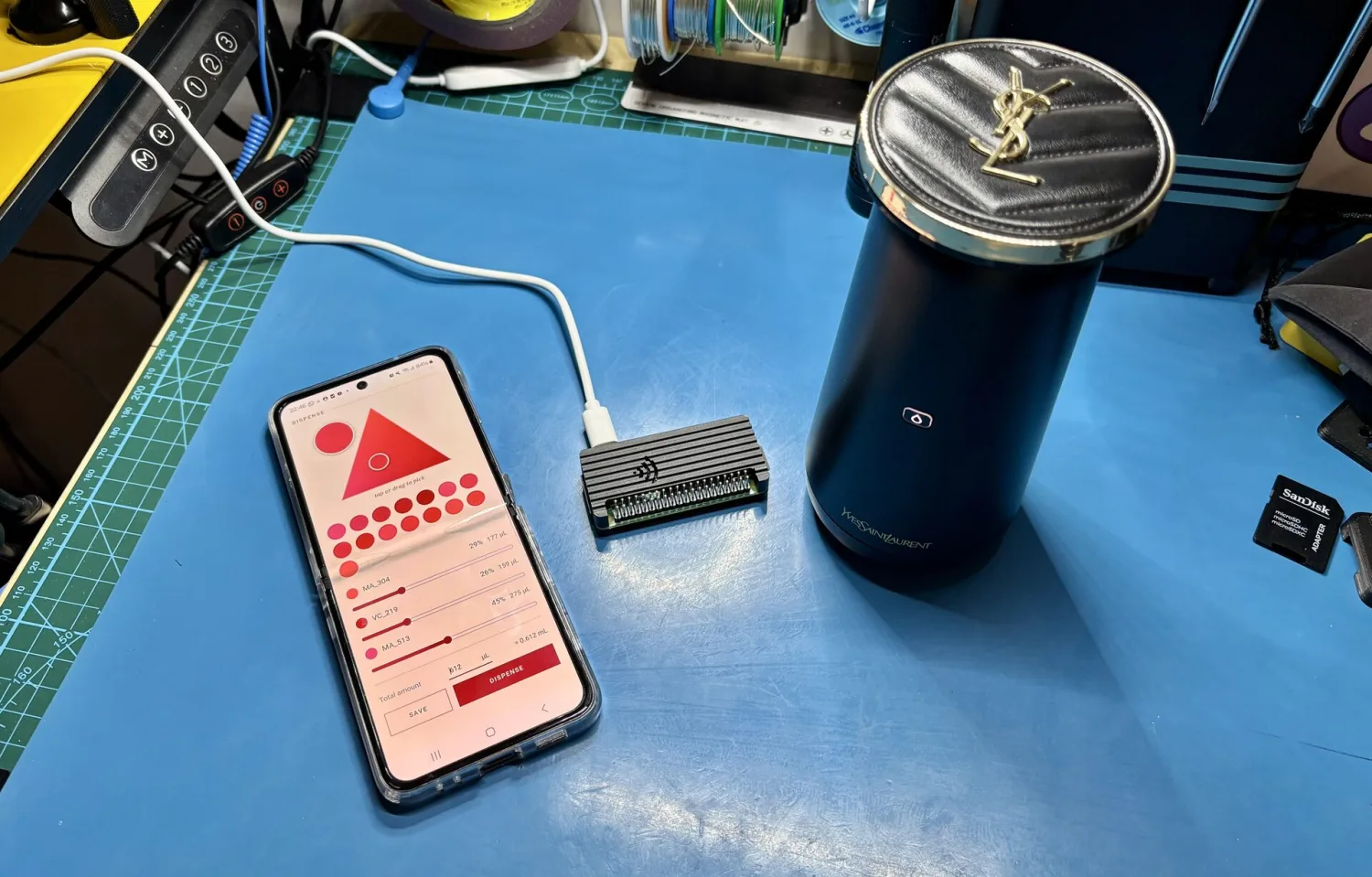
As a bonus, our version unlocks combinations the app was jailing. The official app only allowed specific cartridges to be used together, but the device itself does not care, so now any three cartridges can be loaded and mixed, which opens up far more colours than the official catalogue ever did.
This post walks through how we captured the protocol, what the bytes mean (with real captured frames throughout), and what we built to keep the machine alive.
I. The plan
The goal is simple to state, learn the exact language the app speaks to the device, so our own software can speak it too. The device talks over Bluetooth Low Energy (BLE), the same short-range radio your earbuds use, and every time you press a button in the app it sends the device a little packet of bytes. Learn what those packets look like, and you can send your own.
The attack plan had four steps:
- Record the app while it still works. Capture a real session, byte for byte, of the app driving the device.
- Enumerate the device. List what the device exposes over BLE, to find the two pipes the conversation flows through.
- Decompile the app. The capture shows what bytes were sent, and the app’s own code explains how they are laid out.
- Speak the language ourselves. Put it all in a small Python module and let our own software drive the pumps.
The single most important step is the first one. Code can be misread, but a recorded packet is a fact, the app really did send these exact bytes, and the device really did obey. Everything else is just working out why.
II. Capturing the ground truth
Android can log every Bluetooth packet it sends and receives, it is a checkbox in Developer Options called Bluetooth HCI snoop log (Developer Options itself hides behind the tap-the-build-number-seven-times ritual). So the plan is to switch it on, run one careful session with the real app, then pull the log off the phone.
The pulling happens over USB. Plug the phone into a laptop, enable
USB debugging (in the same Developer Options menu), and
drive it with adb, Android’s command-line remote control. A small
script, phone.sh, wraps this, along with a way to grab the
app itself, and it lives in re_tools/, the directory in the
repo holding all the reverse engineering tools written along the way,
none of which are needed to run the finished app:
./re_tools/phone.sh apk        # copy the app's APK off the phone
./re_tools/phone.sh capture # pull the Bluetooth log -> btsnoop_hci.logAndroid will not let you copy the snoop log straight off the
filesystem, the official way to get it is via a bug report, so
capture asks the phone for one, a big zip that contains the
log, and extracts btsnoop_hci.log from it. (The
apk step is explained in a moment, when we crack it
open.)
During that session, do everything you want to understand, and do it deliberately: connect, let the app recognise the cartridges, then dispense a few colours.
The snoop log is a binary format that Wireshark could probably open
just fine, but it is simpler with a few-line Python script
(re_tools/frames.py) that walks the file and prints just
the ATT writes and notifications:
104.783 WRITE    h=0x000d aa090008373a7e660006074c
105.378 NOTIFY   h=0x000f aa0900003803036d005800...
105.378 NOTIFY   h=0x000f aa0040000125
105.543 WRITE    h=0x000d aa0a2400
105.588 NOTIFY   h=0x000f aa0a2400600000000056435f3232300000...
188.504 WRITE    h=0x000d aa0da60e00aaf900b400b700aa00aa00aa00
196.245 NOTIFY   h=0x000f aa0da600244f0000003a300000e1200000...
That is the whole session in miniature, and by the end of this post you will be able to read every line of it.
III. Getting a look at the device
A BLE device advertises a menu of “characteristics”, think of them as
labelled pipes: some you write to, some notify you when the device has
something to say. Before decoding anything, we list that menu with
re_tools/enumerate.py (built on bleak), a
script with three modes. Run bare, it scans and lists every BLE device
nearby, which is how you find the device’s address in the first place.
Given that address, it connects and dumps the device’s characteristics.
And with a watch argument, it sits on the notify pipe and
prints whatever the device sends, so you can poke a button and see what
comes back.
python re_tools/enumerate.py                      # scan, find the address
python re_tools/enumerate.py F1:6A:23:9C:4E:07    # dump its characteristics
python re_tools/enumerate.py F1:6A:23:9C:4E:07 watch # stream notificationsFinding the device at all has a couple of quirks. It has no useful
advertised name, but it broadcasts a distinctive manufacturer ID,
0xface, that nothing else around uses, so a scan filter
picks it out of the crowd:
$ python re_tools/enumerate.py
Scanning 8s...
  F1:6A:23:9C:4E:07  rssi= -54  (no name)      mfr 0xface  <- the device
  4C:87:5B:11:D2:A8  rssi= -63  Galaxy Buds    mfr 0x0075
  E9:1D:70:3F:88:12  rssi= -71  (no name)      mfr 0x004c
  62:0B:44:0A:E1:9F  rssi= -88  My Thermostat
  ...

Found!
  F1:6A:23:9C:4E:07  rssi= -54  (no name)      mfr 0xface

Add to .env:
  RSM_ADDRESS=F1:6A:23:9C:4E:07
Two more quirks. It only advertises while awake, and it accepts a single central at a time, so anything already connected to it, the official app included, must disconnect first.
It also insists on bonding. Pairing is “Just Works” style, no PIN,
but a machine that refuses to bond gets hung up on instantly, and one
that just ignores the request gets hung up on by the Linux kernel’s 30
second pairing timeout instead. This is a one-off,
make pair drives bluetoothctl to do the bond
once (with the device awake), and BlueZ, the
Bluetooth stack on Linux, remembers it across reboots from then on.
The enumeration turned up good news. The device uses the
Nordic UART Service, an off-the-shelf
profile that is really just “a serial cable over Bluetooth”: one
characteristic you write into, one that notifies you back, and nothing
else. Spotting its distinctive 6E40... identifiers here
tells you two things at once: the machine is almost certainly built on
an nRF chip, and the protocol will be a plain byte stream rather than
anything exotic.
The Nordic UART Service is not part of the official Bluetooth spec.
Nordic Semiconductor make the nRF radio chips that sit inside a huge
number of Bluetooth gadgets, and they ship a software kit for those
chips with a ready-made “serial port” service built in, so manufacturers
who just want to shuttle bytes back and forth tend to leave it exactly
as-is, keeping those same 6E40... identifiers, which is why
they turn up in thousands of hobby and commercial devices.
6E400002-B5A3-F393-E0A9-E50E24DCCA9E   write   (phone -> device)
6E400003-B5A3-F393-E0A9-E50E24DCCA9E   notify  (device -> phone)
There is no encryption on top, no authentication, no challenge-response. The device is not checking who is talking to it, only what is being said, so nothing has to be broken or bypassed here, only understood.
IV. Reading the app’s code
To understand the bytes, we tore the APK open. Getting hold of one is the easy part, version 2.2.2 is on the usual APK mirror sites that archive Android apps.
There is an offline route too, phone.sh apk, since
Android keeps every installed app’s APK on the phone’s filesystem. Over
adb you ask the package manager where the app’s files live
(adb shell pm path <package>) and copy them out
(adb pull), so a phone that still has the app installed
works as the source.
Decompiling it with androguard (re_tools/find_ble.py to
locate the Bluetooth code, re_tools/dump_class.py to read
it) revealed four things, in increasing order of importance.
One doorway for every command. No
matter which button you press, every outgoing packet passes through a
single method, BleManager.send(...). That is a gift, read
or hook that one function and you see every command the app can send,
without chasing logic all over the codebase.
The protocol is plain and unlocked. The Java side confirms what enumeration suggested, standard Nordic UART pipes, bytes in, bytes out.
The interesting logic lives one layer
deeper. The command bytes are not built in the app’s
Java/Kotlin at all. They are built in a compiled C library shipped
inside the APK, libbeam_sdk.so. So the real packet format
meant decompiling that library with Ghidra (re_tools/decompile_pyghidra.py
automates it), which is where everything in the next section comes from.
And for the one value that was awkward to trace statically, we cheated:
Frida hooks the running
app and prints each packet as it is built
(re_tools/frida_ble.js), so you can watch the bytes
assemble themselves in real time.
The clever bit runs in the phone, not the machine. This is the key finding: when you pick a colour, the app does the hard work, it takes your RGB colour and computes how much to pump from each of the three cartridges, then sends the device those raw pump amounts. The device is just three obedient pumps. That split makes sense for the product, keeping the colour maths in the app means it can be tweaked and expanded without touching firmware.
V. The protocol
This is where the two sources come together: the native library
libbeam_sdk.so pulled from the APK, and the btsnoop capture
of the app talking to the device. All of what follows was read off
libbeam_sdk.so in Ghidra and then checked, byte for byte,
against the capture, so it is the spec you would implement against.
For the record, the exact versions we are working with: Android app 2.2.2 (build 640), whose bundled SDK carries the version string 1.1.94, and a device reporting firmware 3.109 on hardware 2.12. 2.2.2 is not the latest release of the app, but the protocol it speaks is unchanged, the frames its SDK builds match our capture byte for byte. Other firmware could differ, though a discontinued device is unlikely to ever see another update.
a) The shape of a message
Every message is a tiny envelope, a short header saying what this is, then the payload. A command from phone to device looks like this:
byte 0  : 0xAA      fixed marker, "a frame starts here"
byte 1  : seq       a counter that ticks up with every frame sent
byte 2  : opcode    which command this is
byte 3  : len       how many payload bytes follow (0..240)
byte 4..: payload   the command's data, if any
The device’s reply has the same shape with one extra byte, a status
code squeezed in after the opcode, 0 meaning OK:
byte 0  : 0xAA
byte 1  : seq       echoed from the request, so replies can be matched up
byte 2  : opcode
byte 3  : status    0 = OK, anything else = an error
byte 4  : len
byte 5..: payload
You might notice there is no checksum anywhere in the frame.
A checksum (or CRC, cyclic redundancy check) is a small number computed from the rest of a message and sent along with it, so the receiver can recompute it and spot corrupted bytes, and most protocols carry one. This one does not need to, because Bluetooth already does exactly that for every radio packet one layer down, so by the time bytes reach the app any corruption has been caught.
It is also worth knowing how numbers bigger than one byte are sent, because the frames below are full of them.
A single byte only counts up to 255, so a value like 270 needs two of
them, a big half and a small half, 270 = 1 x 256 + 14, giving the bytes
01 and 0e. This protocol, like most, sends the
small half first (a convention called little-endian), so 270 appears on
the wire as 0e 01, back to front from how you would write
it on paper. The numbers in every frame below are flipped this way.
The last quirk of the envelope is a read/write flag hidden inside the
opcode byte. All the opcodes are small numbers, so the byte’s topmost
bit (worth 128, or 0x80 in hex) is never used by the opcode
itself, and the protocol recycles it as a marker meaning “this command
changes something”. Reads leave it at zero, writes switch it on, and
switching it on simply adds 0x80 to the byte. That is why
dispense, officially opcode 0x26, shows up in the capture
as 0xA6.
b) The opcodes
Byte 2 is the verb. These are the ones the device understands,
recovered from the jump table in the firmware SDK’s
decodeFrame (re_tools/opcodes.py):
0x00  Handshake        0x40  BatteryLevel
0x02  DeviceInfo       0x41  LidOpened
0x24  ProductionData   0x43  TravelEvent
0x25  UsageData        0x45  ManualDispenseEvent
0x26  Dispense         0x7A  DFU (firmware update)
0x30  TravelMode
0x26 is the “make lipstick” command this whole project
exists to send. Most of the rest are reads (battery, cartridge info) or
events the device pushes (lid opened). 0x7A is the
firmware-update entry point, which will probably never see use again now
that the product is discontinued.
c) A real conversation, annotated
Here is the actual start of the captured session, line by line. First, the app’s opening move:
-> aa 09 00 08 373a7e660006074c
   |  |  |  |  '--- payload
   |  |  |  '------ len = 8
   |  |  '--------- opcode 0x00, handshake
   |  '------------ seq = 0x09
   '--------------- magic
I tested connecting without sending this handshake, and the device drops the connection within about five seconds. The payload is a constant the app always sends (this is the value we confirmed with Frida rather than untangle how the SDK derives it), and replaying it verbatim keeps the device happy.
The device answers with a 56-byte handshake response carrying its lid-open counter and a status block per cartridge slot, and then immediately volunteers this:
<- aa 00 40 00 01 25
         |  |  |  '--- payload: 0x25
         |  |  '------ len = 1
         |  '--------- status = OK
         '------------ opcode 0x40, battery
That is the battery level, 0x25 = 37%, where the top bit of the byte is a charging flag and the low seven bits are the percentage. The device keeps sending these periodically, unprompted, and in our capture it dithers endearingly between 37% and 39% for the whole session.
The app then reads the device’s vital statistics, three empty-payload reads in a row:
-> aa 0a 24 00    read production data
-> aa 0b 25 00    read usage data
-> aa 0c 02 00    read device info
The production data reply is where the cartridges introduce
themselves. The payload holds three 32-byte records, one per slot, and
you can spot the names in the raw hex without any decoding,
56 43 5f 32 32 30 is ASCII for VC_220:
<- aa 0a 24 00 60 00000000 56435f3232300000 a816 da02 3632553630300000 ...
                           '--------------' '--' '--' '--------------'
                            name "VC_220"    |    |     batch "62U600"
                                             |    '---- shelf life, days
                                             '--------- usable amount, mL x1000
Each record also carries manufacture and expiry dates and a CRC. That
may look odd after we just said the protocol needs no checksums, but
this one guards something different, Bluetooth’s CRC only protects bytes
in transit, while these records are stored data, kept in memory
long-term and even written back after every dispense, so each carries
its own check against corrupted or half-written storage. The usage reply
(0x25) is the same idea, three 24-byte records tracking
what has been consumed: whether the tube has been
opened, millilitres remaining, a last used timestamp. And the device
info reply is simply null-separated strings:
<- aa 0c 02 00 2c 4c274f72c3a9616c0052534d00...
                  L ' O r é a l \0 R S M \0 ...
Brand L'Oréal, model RSM (probably for
Rouge Sur Mesure), a serial number, firmware 3.109,
hardware 2.12, and a variant string DVT-2, a
hardware build-phase label.
Consumer hardware goes through a standard sequence of build phases on
its way to mass production: EVT (Engineering Validation Test) to prove
the basic design, DVT (Design Validation Test) where near-final units go
through reliability and certification testing, then PVT (Production
Validation Test) to prove the factory line. Teams iterate within a phase
and number the builds, so DVT-2 is most likely the second
such build.
d) The dispense command
This is the command that matters, so here is the actual captured frame that mixed a red:
-> aa 0d a6 0e 00aa f900 b400 b700 aa00 aa00 aa00
      |  |  |  '--' '-------------' '------------'
      |  |  |  marker  amounts        used flags
      |  |  '--- len = 14
      |  '------ opcode 0x26 | 0x80 (write flag)
      '--------- seq
The payload is three little-endian 16-bit numbers, how much to pump from each cartridge in microlitres (the same scale the cartridge levels are reported in, thousandths of a millilitre), with a constant marker in front and a used/unused flag per tube at the end:
payload[0:2]   = 0xAA00     constant marker
payload[2:4]   = amount, cartridge 0     (here 0x00f9 = 249)
payload[4:6]   = amount, cartridge 1     (here 0x00b4 = 180)
payload[6:8]   = amount, cartridge 2     (here 0x00b7 = 183)
payload[8:10]  = 0x00AA if cartridge 0 is used, else 0
payload[10:12] = 0x00AA if cartridge 1 is used, else 0
payload[12:14] = 0x00AA if cartridge 2 is used, else 0
So that frame means “pump 249 µL from tube 0, 180 from tube 1, 183
from tube 2”, and eight seconds of whirring later the device acks it
with status 0 and a payload of counters we never needed to
decode:
<- aa 0d a6 00 24 4f000000 3a300000 e1200000 ...
            '--- status 0, lipstick achieved
For contrast, here is a pure pink from later in the same capture, a single-cartridge dispense, 270 µL from tube 0 and both other tubes zeroed out, flags and all:
-> aa 10 a6 0e 00aa 0e01 0000 0000 aa00 0000 0000
After each ack the app also writes the updated usage records back to
the device, and the write-flag rule shows up again, that frame’s opcode
byte is 0xA5, which is just 0x25 UsageData
with bit 7 set. The app does the bookkeeping, how many millilitres
remain in each tube, and hands the device the updated records to
store.
Two frames, one byte layout, and the entire mystery of “how does the app tell the machine what colour to make” dissolves into six little-endian integers. A standard catalogue shade totals around 612 µL, which is also why our implementation refuses anything wildly above that, there is no need to find out experimentally what “pump 65,535 µL” does to a machine nobody makes any more.
e) Turning cartridges into colours
One puzzle remained, the device reports which
cartridges are loaded (VC_220, MA_527, …) but
not what colour each one is, and we wanted the web app to preview mixes
and let you pick shades from a colour wheel, not just replay
captures.
The app’s own data came to the rescue. Bundled inside the APK is
offlineAssets.json, the entire shade catalogue, hundreds of
finished shades each listed as an RGB colour plus the recipe that made
it, a percentage from each cartridge. That is enough to solve the puzzle
backwards, because given hundreds of “this mix of tubes makes this
colour” examples, a least-squares fit recovers the single colour of each
individual cartridge.
The fit reproduces every catalogue shade almost exactly. A screen
colour is three channels, red, green and blue, each from 0 to 255, and
the fitted cartridge colours predict every shade’s channels to within 7
of the catalogue’s listed values, an error too small to see. The fit
also confirms the blending is linear, so the web app can preview any mix
accurately, including the cartridge combinations the official app
refused to allow. The twelve recovered cartridge colours live in
protocol.py as a plain dict.
VI. What we built to use it
a) The web app
With the protocol understood, the replacement app almost writes itself. The stack is deliberately small:
protocol.py, the whole protocol as pure functions, frame building and response parsing, no I/O. Because it is pure, it is unit-tested directly against frames from the real capture.device.py, the connection: bonding, the handshake, notifications, and a thread-safe state store, on top of bleak.app.py, a local web server, and some vanilla JS.
The dispense builder, at its core, is about this big:
def build_dispense(amounts, seq=0):
    """Opcode 0x26 with the write bit set, 14-byte payload."""
    flags = (0xAA if a else 0 for a in amounts)
    payload = struct.pack("<4H", 0xAA00, *amounts) + struct.pack("<3H", *flags)
return bytes([0xAA, seq & 0xFF, 0x26 | 0x80, len(payload)]) + payloadThe web page connects, discovers which cartridges are loaded and their colours, and from there you mix a shade on a colour triangle, fine-tune the amount per cartridge, dispense straight from the browser, and save blends as favourites. It also shows the battery and per-cartridge levels, decoded from those same usage records.
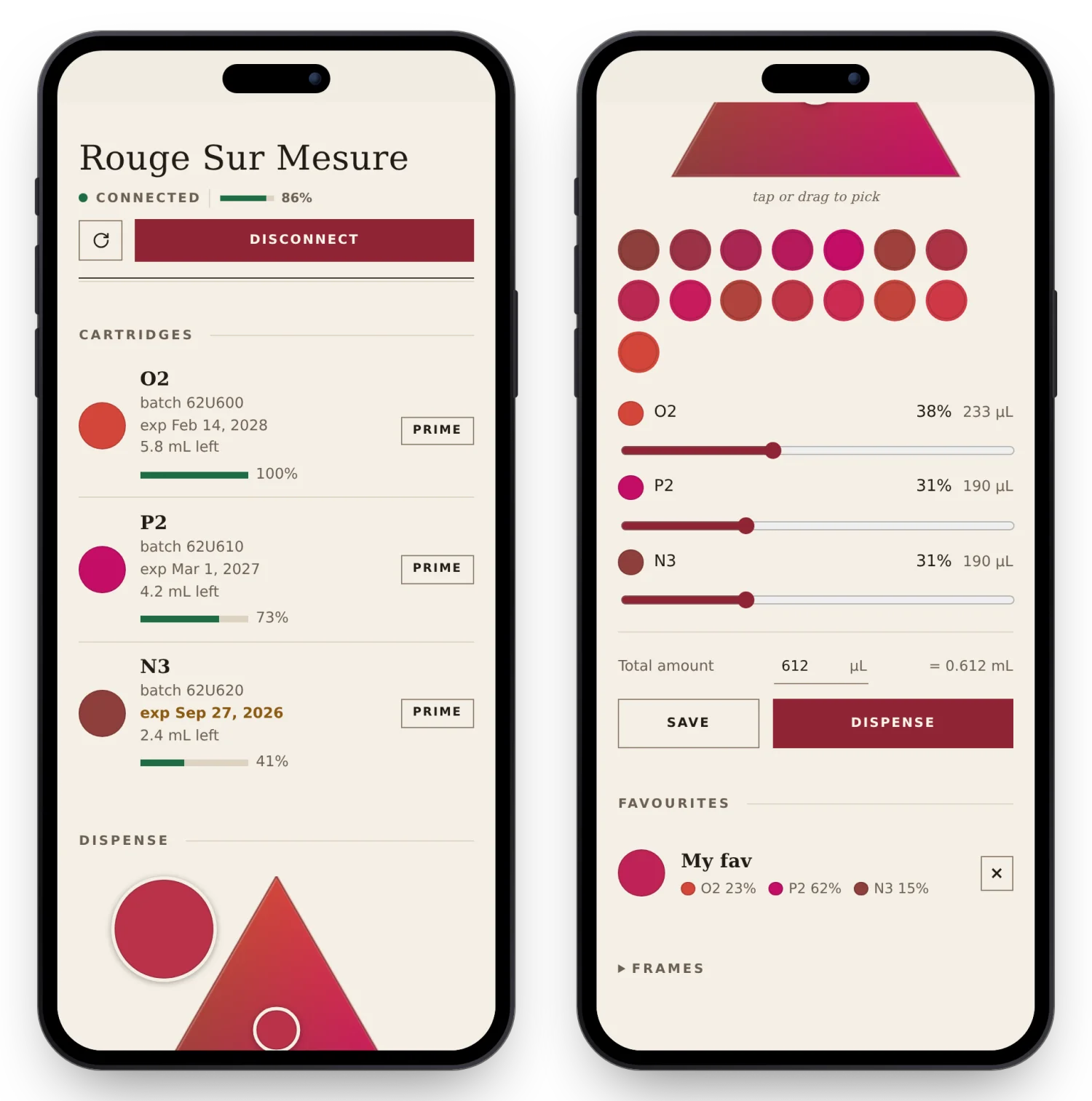 There is even a fake device (
fake_device.py) that answers
the real frame protocol, so the UI can be developed on the sofa with no
hardware and no risk of surprise lipstick.
b) The standalone travel box
The device is meant to travel, so the controller should too. A Raspberry Pi Zero W on a USB power bank runs the server and broadcasts its own Wi-Fi hotspot, so the phone connects straight to the Pi, anywhere, with no home network, no internet and no cloud involved, and a very small footprint.
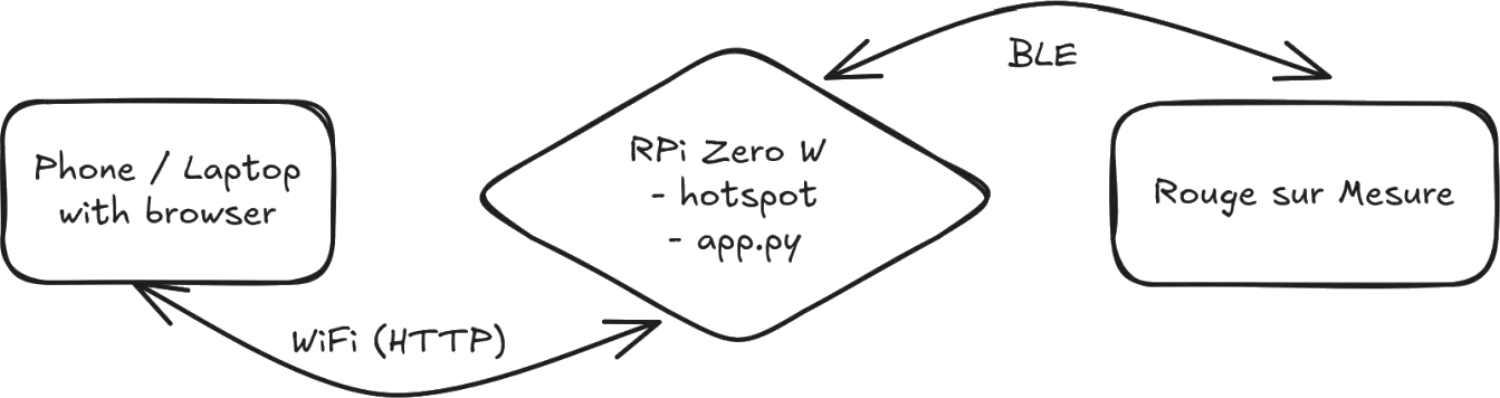
Nothing else is in the picture, no router, no internet, the three boxes are the whole system.
Making that self-contained took a handful of pieces, all installed by
an idempotent pi/setup.sh that reads the same
.env file as everything else. A systemd unit starts the
server at boot, once Bluetooth is up, and restarts it if it crashes,
with the journal kept in RAM to spare the SD card, hostapd broadcasts
the access point, and dnsmasq hands out addresses to whoever joins.
Joining the hotspot also opens the page on its own, through a captive
portal. When a phone joins a Wi-Fi network it quietly fetches a
well-known URL to check the connection works, and on this network every
DNS name resolves to the Pi, where a tiny redirect server
(pi/portal.py) answers every HTTP request by pointing at
the control page, so the phone concludes it has hit a hotel-style login
page and pops it open, except the “login page” is the lipstick control
panel. The one thing that cannot be redirected is https to other sites,
since the Pi cannot hold a valid certificate for someone else’s domain,
which is TLS doing its job.
A hardware gotcha for anyone trying this on a Pi Zero W: the hotspot runs on hostapd rather than NetworkManager’s built-in AP mode, because NetworkManager offers a key-management suite in the Wi-Fi handshake that the Zero W’s firmware leaves out of its beacon, and every client silently drops the mismatch. That one took a while to figure out.
The Pi has a single radio, so while the hotspot is up it is off the
home network entirely, and maintenance happens through the hotspot
itself, SSH to the Pi’s address, or make deploy from the
laptop, which copies the checkout over SSH and restarts the service.
c) Or just your home network
The travel box is the fully self-contained option, but at home it is
simpler still, the hotspot is not needed at all. The server runs on any
machine with a Bluetooth adapter near the device, a laptop or an
always-on Pi on your normal Wi-Fi, and you reach the page from your
phone over the LAN. By default it binds to localhost only, and setting
RSM_LAN=1 opens it to the rest of the network, so
http://raspberrypi.local:8765 from any browser at home
reaches a Pi running it.
There is no login, so treat it as trusted-LAN only, anyone who can reach the address can drive the pumps.
~~~
Wrapping up
The device now takes its orders from our software rather than the discontinued Android app, so my partner keeps her lipstick machine for good, and with more colours to play with than the official catalogue ever allowed.
There is one problem software cannot fix, though, the cartridges. The device and app are discontinued, so the official cartridges are on their way out too, which means the machine is only as immortal as the stock of refills. Thankfully my partner has a decent pile of them, enough to keep her mixing for a few more years. And when the very last one runs dry, at least this will have been a really fun thing to hack on.
Nothing here was hacked or broken into. We own the device, it has no encryption or authentication to bypass, and it runs on the official cartridges. This is interoperability, working out how to make your own software talk to hardware you own, which UK and EU law explicitly allows (the interoperability exception, UK s50B CDPA). The one rule that comes with it is that the app’s own code stays private, so the repo publishes only the protocol facts we worked out, frame layouts, captured bytes, fitted colours, never the decompiled app or the APK. Not legal advice, and the picture may differ where you are.
Links
- re-ysl-rsm (b7595a4), the full project: protocol spec, web app, Pi setup, and the reverse engineering tools
- bleak, cross-platform BLE for Python
- Ghidra, the NSA’s software reverse engineering suite
- Frida, dynamic instrumentation toolkit