Making ZSH fast
Introduction
In a previous post, I walked through my modular ZSH configuration, covering the structure, hacks, prompt, and tool integrations. There will be some crossover with that article, though a few things have changed and been improved since. I have been chasing startup time, trying to get as close to instant as possible without giving up features.
The goal: a shell that starts in under 30ms, with git status in the prompt, syntax highlighting, completions, and configs for a dozen tools. No framework, no plugin manager, no daemon processes.
My philosophy is to only use what I need, and when possible, write it myself rather than pulling in plugins. This is not advice that everyone should do the same, but I like being in full control of what happens in my shell.
This post covers the tips and tricks that got me there, with profiling data and benchmarks.
I. Why it matters
Shell startup time compounds. You open terminals constantly, split tmux panes, run
zsh -c in scripts, spawn subshells from editors. A 200ms
startup is barely noticeable once, but it becomes friction when it
happens dozens of times a day.
Most of the overhead comes from loading things you don’t need yet, or loading them in expensive ways.
II. Measuring
You can not optimize what you can not measure. ZSH ships with two useful tools for this.
a)
time and timezsh
The simplest benchmark is time:
$ time zsh -i -c exit
zsh -i -c exit  0.01s user 0.02s system 96% cpu 0.029 total
This starts an interactive shell (-i), runs
exit, and reports the wall-clock time. On my machine, a
bare zsh --no-rcs takes 4ms. My full config takes about
29ms here (0.029 total). Averaged over multiple runs, it settles around
24ms.
For more consistent results, I use a timezsh function
that averages multiple runs:
# ~/.zsh/functions/timezsh (autoloaded)
zmodload zsh/datetime
runs=${1:-10}
total_ms=0

for i in {1..$runs}; do
  start=$EPOCHREALTIME
  zsh -i -c exit >/dev/null 2>&1
  end=$EPOCHREALTIME
  delta_ms=$(( (end - start) * 1000 ))
  total_ms=$(( total_ms + delta_ms ))
  printf "run %2d: %3.0f ms\n" "$i" "$delta_ms"
done

printf "\nAverage: %.0f ms\n" "$(( total_ms / runs ))"Each iteration spawns a fresh interactive ZSH process
(zsh -i), which sources .zshrc and the full
config chain, then immediately exits (-c exit).
$EPOCHREALTIME from the zsh/datetime module
captures wall-clock time before and after each fork, so the delta is the
real startup cost: process creation, config sourcing, and teardown.
Running it with 10 iterations:
$ timezsh 10
run  1:  27 ms
run  2:  25 ms
run  3:  27 ms
run  4:  26 ms
run  5:  23 ms
run  6:  22 ms
run  7:  23 ms
run  8:  23 ms
run  9:  24 ms
run 10:  23 ms

Average: 24 ms
b) zprof
For a detailed breakdown, ZSH’s built-in profiler shows where time is spent:
# top of .zshrc
if (( ${+DEBUG_ZSH_PERF} )); then
  zmodload zsh/zprof
fi

# ... config loads ...

# bottom of .zshrc
if (( ${+DEBUG_ZSH_PERF} )); then
  zprof
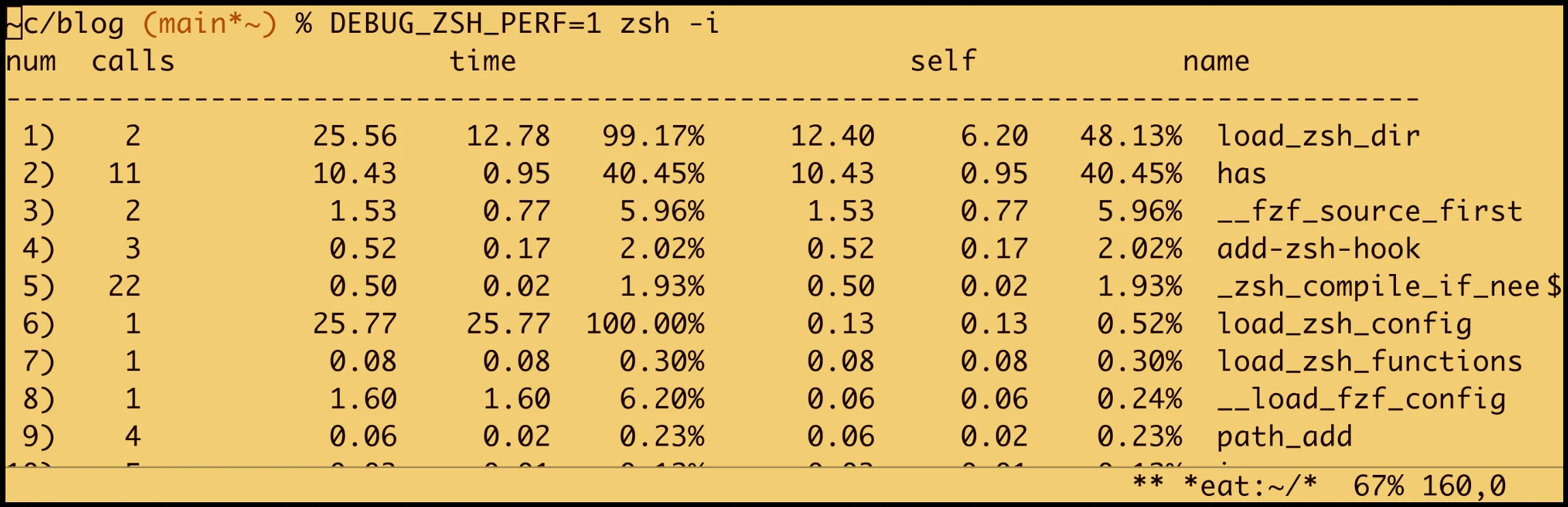
fiRun it with DEBUG_ZSH_PERF=1 zsh -i to get a
function-level profile (shortened here):
num  calls       time        self        name
-------------------------------------------------
 1)   11         9.95ms     9.95ms  has
 2)    2        21.84ms     9.42ms  load_zsh_dir
 3)    2         1.39ms     1.39ms  __fzf_source_first
 4)   22         0.46ms     0.46ms  _zsh_compile_if_needed
 5)    3         0.45ms     0.45ms  add-zsh-hook
# ...
The profile reveals what is actually slow. In my case, the
has checks (11 calls to test if commands exist) take about
10ms total, and loading tool directories takes most of the remaining
time. Bytecode compilation checks are cheap at 0.46ms for 22 files.
III. Bytecode compilation
ZSH can compile scripts to a bytecode format (.zwc
files), similar to Python’s .pyc. The compiled version is
loaded automatically when present and newer than the source.
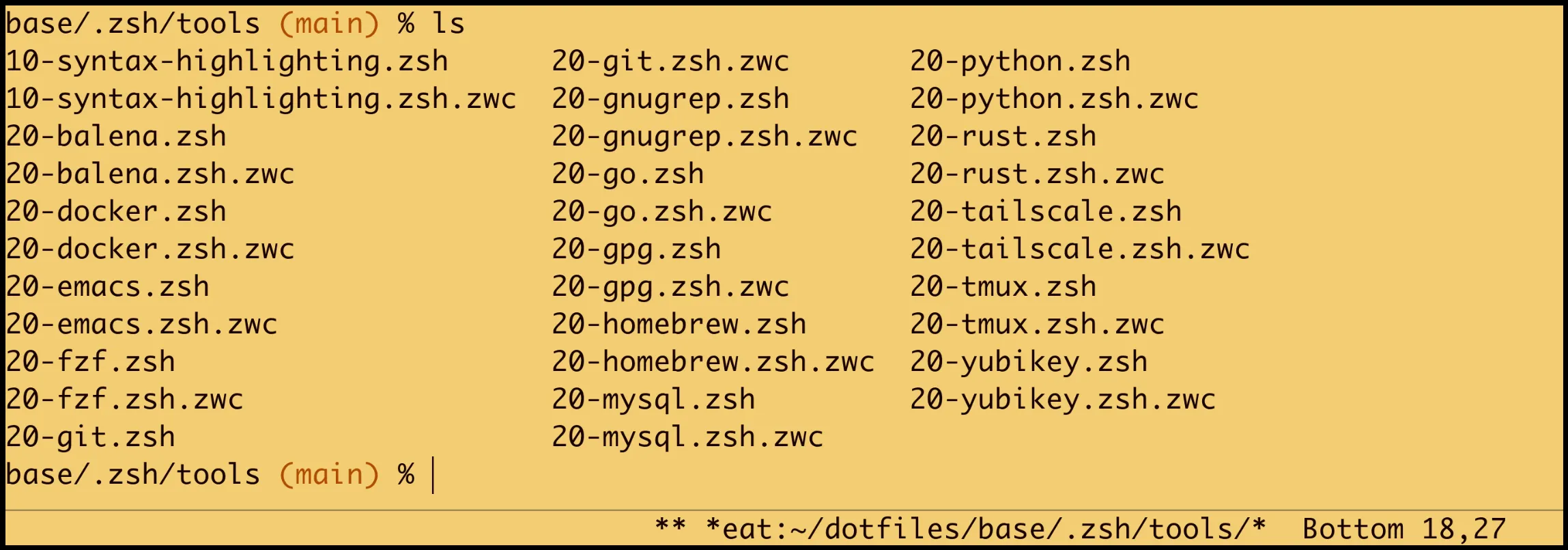
_zsh_compile_if_needed() {
  local src=$1 dst="${1}.zwc"
  [[ -n $src && -r $src ]] || return 1
  if [[ ! -f $dst || $src -nt $dst ]]; then
    zcompile "$src" 2>/dev/null
  fi
}This is called before sourcing each config file:
load_zsh_dir() {
  local dir=$1 file
  [[ -d $dir && -r $dir ]] || return 0
  for file in "$dir"/*.zsh(N); do
    [[ -r $file ]] || continue
    _zsh_compile_if_needed "$file"
    source "$file"
  done
}The first shell startup after editing a file compiles it. Every subsequent startup uses the cached bytecode. The check itself is nearly free, just a file stat comparison.
Compilation also applies to the completion dump file
(.zcompdump), which is one of the more expensive files to
parse.
IV. Deferred initialization
The single biggest optimization is deferring work that does not need
to happen before the first prompt appears. ZSH’s precmd
hook runs just before each prompt is drawn. By scheduling initialization
there, the shell becomes interactive immediately, and the setup finishes
in the background of the first prompt render.
a) Completion system
compinit is expensive. It scans fpath
directories, reads completion functions, and builds an internal lookup
table. On a clean run, this takes 30-60ms. With caching (-C
flag), it drops to a few milliseconds, but even that is wasted if you
don’t need completion before the first prompt. The gain is modest on its
own, 24ms deferred vs 34ms synchronous, but when chasing startup time
every millisecond counts.
autoload -Uz compinit

__deferred_compinit() {
  local dump_dir=${XDG_CACHE_HOME:-$HOME/.cache}/zsh
  local dump=$dump_dir/.zcompdump
  mkdir -p "$dump_dir" 2>/dev/null

  if [[ ! -f $dump ]]; then
    compinit -d "$dump"
  else
    compinit -C -d "$dump"  # -C skips security check
  fi
  _zsh_compile_if_needed "$dump"

  # wire up alias-expansion now that compinit has run
  zle -C alias-expansion complete-word _generic
  bindkey '^a' alias-expansion

  add-zsh-hook -d precmd __deferred_compinit
  unfunction __deferred_compinit
}

autoload -Uz add-zsh-hook
add-zsh-hook precmd __deferred_compinitThe pattern is consistent: register a precmd hook, do
the work, unhook and delete the function. The hook only runs once.
The -C flag tells compinit to skip the security check
that verifies file ownership and permissions on completion files. This
check is redundant on a single-user machine and saves a noticeable
amount of time.
b) Git alias generation
My config auto-generates g<alias> shell aliases
from git’s own alias configuration (e.g., gco for
git checkout). This requires forking
git config, which adds a few milliseconds to startup (28ms
vs 24ms). Small, but free to defer:
__load_git_aliases() {
  local line key name
  local git_alias_lines

  git_alias_lines=(
    "${(@f)$(git config --get-regexp '^alias\.' 2>/dev/null)}"
  )

  for line in $git_alias_lines; do
    key=${line%% *}       # "alias.co"
    name=${key#alias.}    # "co"
    alias "g${name}=git ${name}"
  done

  alias g="git"
  add-zsh-hook -d precmd __load_git_aliases
  unfunction __load_git_aliases
}

autoload -Uz add-zsh-hook
add-zsh-hook precmd __load_git_aliasesBy deferring this to the first prompt, the git config
fork happens after the shell is already interactive. You never notice
the delay.
c) The self-cleaning hook pattern
Both examples above follow the same pattern:
__deferred_work() {
  # ... do expensive thing ...
  add-zsh-hook -d precmd __deferred_work
  unfunction __deferred_work
}
add-zsh-hook precmd __deferred_workRegister a precmd hook, do the work on first prompt,
then unhook and clean up. No ongoing cost after initialization, and the
function is removed from memory.
V. The prompt
The prompt is the most latency-sensitive part of the config, it runs before every single command. A slow prompt makes the entire shell feel sluggish.
a) Avoiding subshell forks
A common approach is to use command substitution in the prompt string:
# slow: forks a subshell on every prompt
PROMPT='$(__git_status) %# 'Every $(...) in the prompt string forks a subshell. Even
a fast function adds measurable overhead when it forks on every
keypress.
What I do instead is compute everything in a precmd hook
and store results in variables:
__prompt_precmd() {
  local last_status=$?

  __ps_err='' __ps_tag='' __ps_venv='' __ps_git=''

  # exit status
  (( last_status )) && __ps_err="%F{red}?${last_status} "

  # session tag
  [[ -n $_PROMPT_TAG ]] && \
    __ps_tag="%B%F{87}%K{20}[${(U)_PROMPT_TAG}]%b%f%k "

  # virtualenv
  (( ${+VIRTUAL_ENV} )) && \
    __ps_venv="venv(${VIRTUAL_ENV##*/}) "

  # git (details in next section)
  # ...
}

add-zsh-hook precmd __prompt_precmd

PROMPT='${__ps_err}${__ps_tag}${__ps_venv}'
PROMPT+='%f%3~%f${__ps_git}%# 'The prompt string now just references variables, no subshells. The
precmd hook does the same work, but runs in the current
shell process instead of forking a child for each $(...).
The cost is the same computation, without the overhead of process
creation on every prompt render.
b) Fast git status
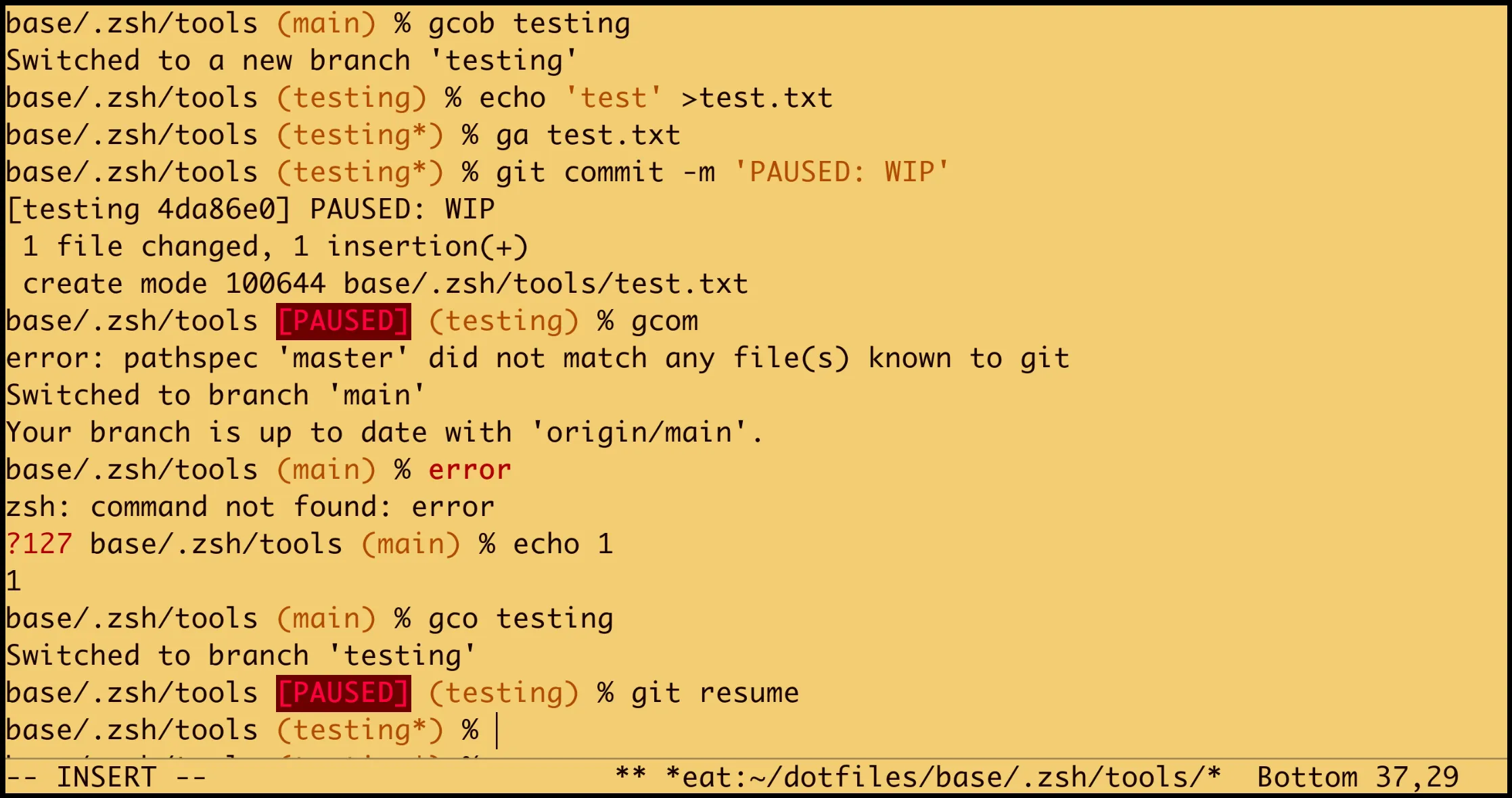
The git segment is the most expensive part of the prompt. It needs to check branch name, dirty state, and a custom PAUSED badge. Here is how I made it fast, keeping everything internal with no plugins or external tools:
# inside __prompt_precmd
local gstatus branch dirty root paused

gstatus=$(
  GIT_OPTIONAL_LOCKS=0 \
  git status --porcelain=v2 -b \
    --no-ahead-behind 2>/dev/null
) || return

branch=${gstatus#*branch.head }
branch=${branch%%$'\n'*}
[[ -z $branch || $branch == "# "* ]] && return

[[ $gstatus == *$'\n'[^#]* ]] && dirty='*'
[[ -e .git ]] && root='~'Three things make this fast:
GIT_OPTIONAL_LOCKS=0
tells git not to acquire the optional repository lock. In a prompt
context, you only read state, you never write it. Skipping locks avoids
contention on busy repositories where other git processes might hold the
lock. Since it’s set inside the $(...) subshell, it doesn’t
persist in your normal shell session.
--no-ahead-behind
skips counting commits ahead and behind the remote. This avoids
network-related delays and an extra traversal of the commit graph. If
you don’t display ahead/behind counts in your prompt, there is no reason
to compute them.
--porcelain=v2 gives a
machine-stable output format that includes branch metadata in header
lines (prefixed with #). Dirty files appear as non-header
lines, so checking for dirtiness is a single pattern match rather than
counting output lines:
# branch.oid bf82688de9aaa75acf3c6400a3295d966204fdde
# branch.head main
# branch.upstream origin/main
? content/blog/fast-zsh.dj
? static/images/fast-zsh/
c) OID caching for commit subject
My prompt shows a PAUSED badge when the last commit message starts
with “PAUSED”. This requires reading the commit subject, normally a
git log fork. But the OID (object ID) is the SHA of the
HEAD commit, and a commit’s subject is immutable, so a given OID always
maps to the same message. HEAD only changes on commits, checkouts, or
rebases, not between normal prompt renders. Caching by OID avoids
redundant forks:
local oid=${gstatus#*branch.oid }
oid=${oid%%$'\n'*}
if [[ $oid != "${__git_prev_oid-}" ]]; then
  __git_prev_oid=$oid
  __git_prev_subject=$(
    git log -1 --format=%s 2>/dev/null
  )
fi
[[ $__git_prev_subject == PAUSED* ]] && \
paused=' %B%F{198}%K{52}[PAUSED]%b%f%k'The porcelain=v2 output already includes
branch.oid, so extracting it is free. When HEAD hasn’t
changed (which is most prompts), the cached subject is reused and no
git log fork happens. This effectively reduces the prompt
to a single git command in the common case.
VI. Replacing external plugins
I used zsh-syntax-highlighting for years, and it’s very good. But it does far more than I need or use, with full syntax analysis, dozens of token types, and path validation. For my use case, a fraction of its functionality is enough. You can hook in lots of colors and rules, but I like to keep things minimal.
I replaced it with ~60 lines of custom highlighting using ZSH’s
built-in region_highlight mechanism:
__syntax_hl() {
  emulate -L zsh

  # skip if buffer unchanged (redraws without edits)
  [[ $BUFFER == "${__syntax_hl_prev-}" ]] && return
  __syntax_hl_prev=$BUFFER
  region_highlight=()

  (( $#BUFFER )) || return

  # first word (skip leading whitespace and VAR=val prefixes)
  local cmd=${BUFFER##[[:space:]]#}
  local -i offset=$(( $#BUFFER - $#cmd ))
  cmd=${cmd%%[[:space:]]*}
  [[ -n $cmd ]] || return
  while [[ $cmd == *=* ]]; do
    local rest=${BUFFER:$(( offset + $#cmd ))}
    rest=${rest##[[:space:]]#}
    offset=$(( $#BUFFER - $#rest ))
    cmd=${rest%%[[:space:]]*}
    [[ -n $cmd ]] || return
  done

  local -i cmd_end=$(( offset + $#cmd ))

  # rm: dim bold on the whole line
  if [[ $cmd == rm ]]; then
    region_highlight+=("0 $#BUFFER fg=90,bold")
    return
  fi

  # sudo: purple bold
  if [[ $cmd == sudo ]]; then
    region_highlight+=("$offset $cmd_end fg=164,bold")
    return
  fi

  # unknown command: red bold
  if ! whence -- "$cmd" >/dev/null 2>&1; then
    region_highlight+=("$offset $cmd_end fg=red,bold")
  fi

  # quoted strings
  local QS="'" QD='"'
  local -i pos=1 sq dq next close
  while (( pos <= $#BUFFER )); do
    sq=${BUFFER[(ib:pos:)$QS]}
    dq=${BUFFER[(ib:pos:)$QD]}
    if (( sq < dq )); then
      next=$sq
      close=${BUFFER[(ib:next+1:)$QS]}
    elif (( dq <= $#BUFFER )); then
      next=$dq
      close=${BUFFER[(ib:next+1:)$QD]}
    else
      break
    fi
    if (( close <= $#BUFFER )); then
      region_highlight+=(
        "$(( next - 1 )) $close fg=yellow"
      )
      pos=$(( close + 1 ))
    else
      break
    fi
  done
}

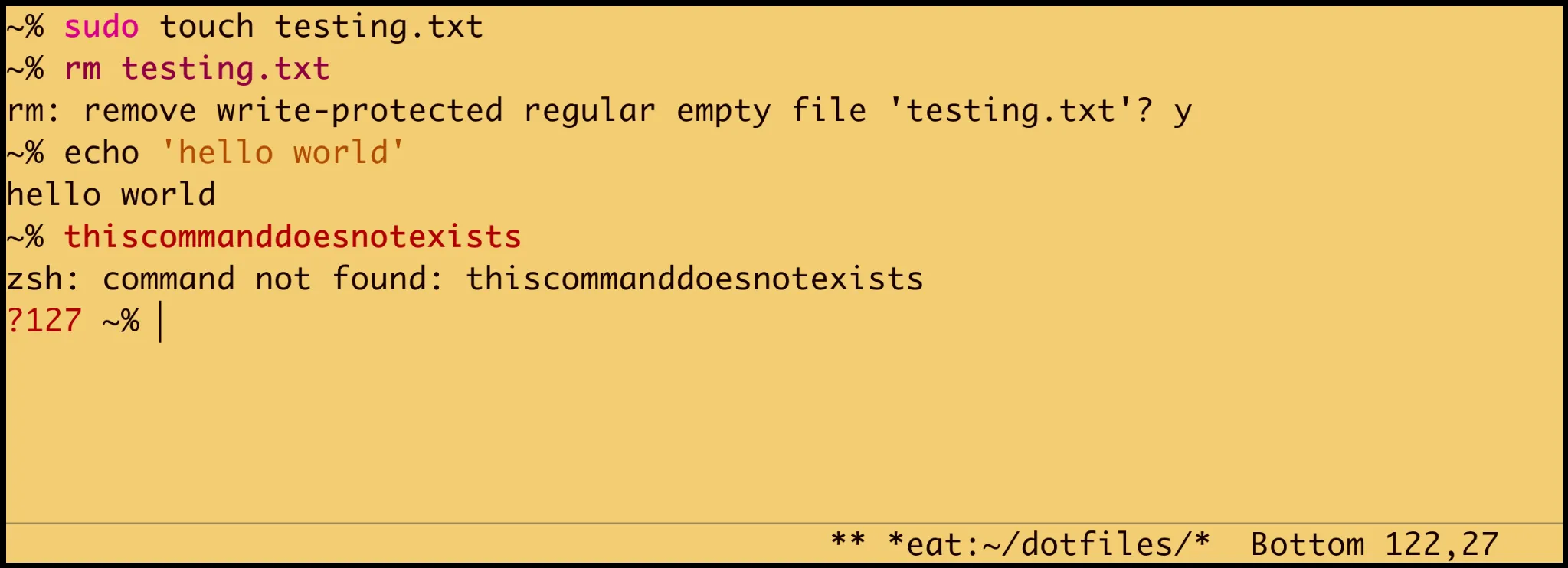
zle -N zle-line-pre-redraw __syntax_hlThis highlights four things: unknown commands (red), rm
(dim bold as a visual warning), sudo (purple), and quoted
strings (yellow). That covers the patterns I actually care about.
The buffer caching (__syntax_hl_prev) is key. The
zle-line-pre-redraw hook fires on every redraw, including
cursor movement and window resizes. Without the cache check, the
highlighting logic would run on every keystroke even when nothing
changed.
The result: no external dependencies, no plugin manager, no slow
initialization, and highlighting that covers the dangerous patterns
(rm, sudo), unknown commands, and quoted
strings as nice visual indicators.
VII. Conditional loading
Every tool config checks if the tool exists before doing anything:
has git || return
has docker || return
has fzf || returnThe has function uses ZSH’s $commands
associative array, which is a hash lookup, not a which or
command -v fork:
has() {
  local cmd
  for cmd in "$@"; do
    (( $+commands[$cmd] )) || return 1
  done
}This has two benefits. On machines where a tool isn’t installed, there is zero cost, the file returns immediately. And it avoids errors from trying to configure nonexistent commands.
With 16 tool config files, this adds up. On a minimal server with only git installed, most tool configs bail out in microseconds.
VIII. Autoloaded functions
Functions in ~/.zsh/functions/ are registered with
fpath and autoload, not sourced:
load_zsh_functions() {
  local fn_dir=${1}/functions
  [[ -d $fn_dir ]] || return 0

  fpath=("$fn_dir" $fpath)
  autoload -U "$fn_dir"/*(:tN)
}ZSH’s autoload mechanism only records the function name at startup.
The function body is read from disk on first call. For functions like
timezsh, cr (jump to git root), or
take (mkdir and cd), this means zero startup cost. The
function loads when you actually use it.
IX. What to avoid
Some things that seem like they should help but don’t, or that actively hurt:
Plugin managers. Don’t get me wrong, tools like Oh My Zsh, Prezto, or zinit are really good and helpful, specially if you want something nice and pretty that works out of the box. But they add their own initialization overhead. If you’re loading a handful of features, writing them yourself could often be faster, as you only use what you actually need, and gives you complete control over when things load.
Prompt daemons. Tools like gitstatus run a background process for git
information. Very effective for large monorepos, but overkill for most
normal-sized repositories and adds complexity. A single
git status --porcelain=v2 with the right flags is most of
the time fast enough, and avoids another external dependency and a
running daemon.
Lazy eval wrappers. A
common pattern is wrapping tool init (e.g. pyenv) in a
function that replaces itself on first call:
# avoid this
pyenv() {
  unfunction pyenv
  eval "$(pyenv init -)"
  pyenv "$@"
}This saves startup time but the first invocation takes the hit
instead, and completions won’t be available until you’ve called the
command once. Deferring to precmd avoids both issues, since
everything is ready before you type your first command.
Excessive history sizes without
limits. A large HISTSIZE is fine
(HISTSIZE=1000000), but ZSH loads the entire history into
memory on startup. At around 30 bytes per entry, a million records would
be roughly 30MB. Unlikely to cause issues on modern machines, but worth
keeping an eye on if your history grows unchecked.
X. Results
The final numbers on my machine (Fedora, Ryzen 7, NVMe):
Bare ZSH (--no-rcs):   4 ms
Full config:           24 ms
Overhead:              20 ms
That 20ms buys: modular config loading with bytecode compilation, completion system with caching, git status in prompt with OID caching, custom syntax highlighting, FZF with ripgrep, and configs for git, Docker, Python, Emacs, tmux, Tailscale, etc.
Comparison with frameworks
For context, I benchmarked Oh My Zsh and Prezto on the same machine. To keep each test
isolated, I used ZDOTDIR and HOME to point ZSH
at a temporary directory with a fresh install, so nothing interferes
with the host config:
# example for Oh My Zsh
ZDOTDIR=/tmp/zsh-bench/omz HOME=/tmp/zsh-bench/omz \
zsh -i -c exitBoth frameworks were configured with minimal defaults: Oh My Zsh with
the robbyrussell theme and the git plugin,
Prezto with its standard modules (completion, prompt, git,
syntax-highlighting). Not entirely apples-to-apples since they ship more
features out of the box, but it gives a sense of the baseline cost.
Ignoring the first cold run (cache warming), the steady-state averages
were:
Oh My Zsh (default + git plugin):   ~118 ms
Prezto (default modules):           ~119 ms
My config:                           ~24 ms
To be clear, ~120ms is already a great result. Both frameworks should feel pretty fast for most people. The difference is only noticeable if you’re obsessive about shaving every millisecond, which I admittedly have a lot of fun doing…
~~~
Wrapping up
The techniques here are not exotic. Bytecode compilation, deferred initialization, precmd hooks, conditional loading, and caching. None of them are new ideas. The key is applying them systematically: measure, find the bottleneck, defer or eliminate it, measure again.
Again, this is just how I like to do things. Not everyone needs to write their own syntax highlighting or prompt. But if you enjoy being in control of every piece of your shell, it’s a rewarding way to work.
Links
- My dotfiles (26a4859), full configuration including ZSH
- A modular ZSH setup, the companion article covering the full config walkthrough
- ZSH documentation, the official reference