A coding font journey
Introduction
Programmers stare at text all day. The font that renders it shapes how the screen feels, how readable the code is, how pleasant it is to sit down and work. Most people pick a default and never think about it again. I have never been able to do that.
Over the years I have gone through dozens of monospace fonts, chasing something that is hard to articulate: a font that is clean, readable, a little bit niche, and has some personality to it. Not flashy, not trendy, just right. No ligatures, no fancy arrows, no programming font gimmicks. Just good letterforms in a fixed-width grid.
This post traces that journey, from the defaults that came with my operating systems to the bitmap rabbit hole, a paid typeface that felt like a luxury, and eventually putting together my own.
I. Consolas and the Windows years
I started programming on Windows, writing Visual Basic in the stock IDE, then moving to PyCharm for Python. The default font was Consolas, Microsoft’s ClearType-optimized monospace designed by Luc(as) de Groot and released in 2006. It shipped with Vista and quickly became the standard coding font on Windows.
Consolas is genuinely good. It is crisp, well-hinted for LCD screens, and has a slightly rounded quality that makes it feel approachable.
And the italic i, with its elegant, slightly
calligraphic stroke. A small detail, but the kind of thing that makes
you notice a typeface.
It does what a coding font should do, which is disappear and let you focus on the code.
At the time I did not think much about fonts. Consolas was the default, it looked fine, and I had bigger things to worry about, like actually learning to program. But it set a baseline: clean, readable, no-nonsense. Every font I have used since gets measured against that first impression.
II. Monaco and macOS
When I moved to macOS, the terminal greeted me with Monaco, designed in 1984 by Susan Kare and Kris Holmes for the original Macintosh. It has a character that is hard to pin down. The letters are slightly condensed, the curves are a little quirky, and it looks like it belongs on a screen from a different era. Not retro, exactly, but not modern either.
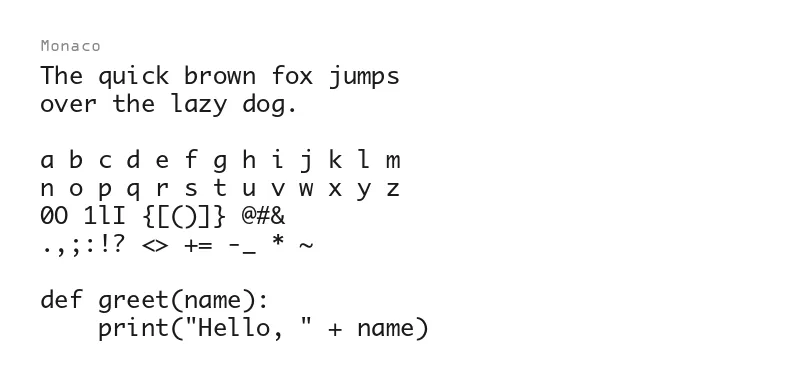
This was also around the time I moved from PyCharm to Vim, which became my editor for years. Vim in a terminal with Monaco felt like the right combination. Minimal interface, sharp text, no distractions.
Apple eventually replaced Monaco with Menlo as the system monospace, which itself is a customized DejaVu Sans Mono. Then came SF Mono, Apple’s own take on a modern coding font. Both are perfectly fine fonts. Menlo is clean and wide. SF Mono is polished and neutral.
I tried both, but Monaco still worked best for me. My eyes had grown attached to it, and everything else felt slightly off.
There was something about those slightly narrow letterforms, the way it renders at small sizes, the personality baked into every glyph. It felt like my font, not just a system default. Menlo and SF Mono feel engineered for maximum neutrality, while Monaco feels like it has a point of view.
Even after switching to Linux as my daily setup, I brought it with me. The licensing around using Monaco outside macOS is questionable, but I could not let it go. It was always the font I would compare everything else against.
III. The search for personality
At some point, wanting something with more character (pun not
intended), I stumbled onto Fantasque Sans Mono. It was unlike anything I had
used before. The letters have a hand-drawn quality, almost calligraphic.
The italic variant leans into this even further, with curves that feel
more like handwriting than code. The lowercase k has a
loop. The f has a playful descender. The asterisk looks
like a tiny flower.
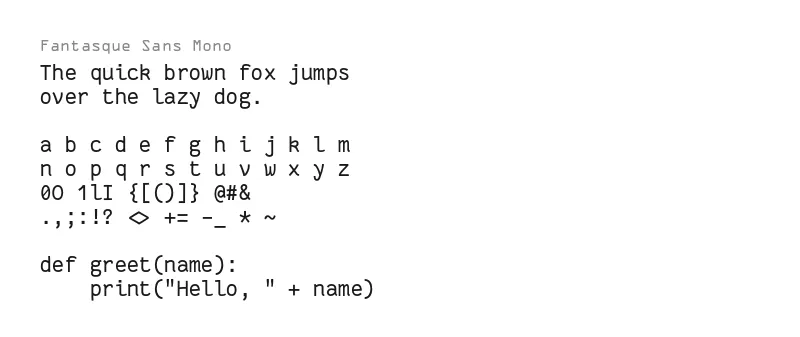
Fantasque scratched an itch I did not know I had: I wanted my editor to look different. Not just functional, but expressive. The font is perfectly legible at coding sizes, but it has a warmth and humanity that makes staring at a terminal for eight hours slightly more pleasant. I used it heavily and it remains one of my favourite monospace fonts.
Then I discovered Triplicate, a paid typeface by Matthew Butterick. It is a coding font with the DNA of a text face, inspired by typewriter fonts but refined for modern screens. It comes in three variants: Code (monospace), Poly (proportional), and Text (also proportional but optimized for body text). I bit the bullet and paid for the Code variant.
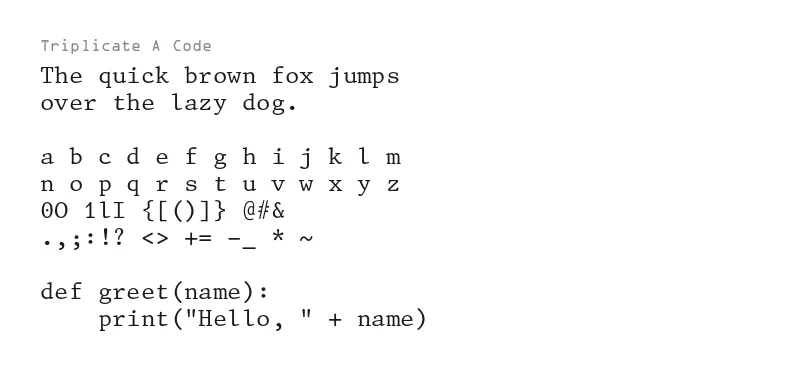
Triplicate Code is just clean. It feels different from every other monospace font in a way that is hard to describe. There is a classic quality to it, like reading code on a well-maintained typewriter. The serifs are subtle, the spacing is generous, and every glyph feels considered. It is one of those fonts that makes you notice the craft behind it. Premium, in the best sense. I used it for a long time and it never got old.
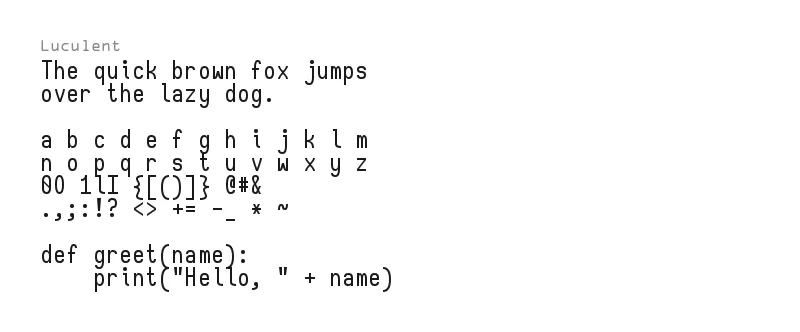
A special mention goes to Luculent, with a clean, slightly rounded style that works surprisingly well for code. It is one of those fonts that you try on a whim and end up using for months.
IV. The bitmap era
When I moved to Linux full-time, something shifted. The ecosystem is different. You are closer to the metal, you configure everything yourself, and there is a long tradition of bitmap fonts in terminal emulators and tiling window managers. Screenshots on forums and subreddits showed setups running tiny, pixel-perfect bitmap fonts that looked nothing like the smooth, anti-aliased typefaces I was used to.
Bitmap fonts render each glyph as a fixed grid of pixels, no anti-aliasing, no hinting, no subpixel rendering. Every pixel is either on or off. At the right size on the right screen, they look incredibly sharp. There is zero ambiguity in the rendering, what you see is exactly what the designer drew, pixel by pixel.
The appeal goes beyond aesthetics. Bitmap fonts are fast, they are tiny, and they have a nostalgic quality that pairs well with minimal Linux setups. A tiling window manager, a simple status bar, and a bitmap font in the terminal, it all fits together.
I went deep. I hunted for hidden gems that most people had never heard of. Two that stood out:
Greybeard is a bitmap font with a programmer’s sensibility.
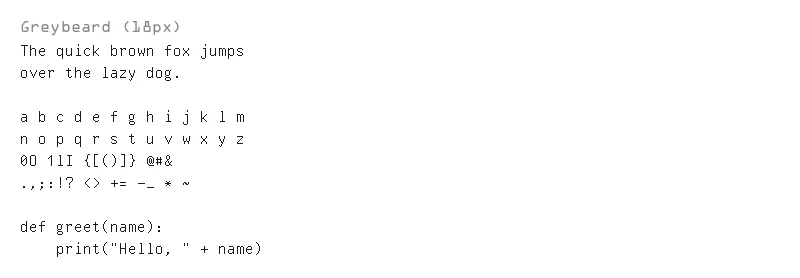
It has excellent glyph distinction and works well at small sizes. Finding it felt like discovering a secret, the kind of font that does not show up in “top 10 coding fonts” listicles but quietly does everything right.
sq is even more obscure, a tiny square bitmap font that is almost aggressively minimal.
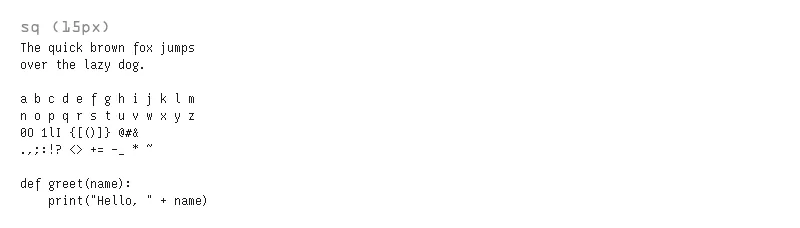
It is the kind of font you use when you want your terminal to look like it belongs on a piece of industrial equipment. Not for everyone, but it has a raw, utilitarian charm.
The bitmap era taught me something about what I actually want from a coding font. I like the crispness, the lack of anti-aliasing blur, the feeling that every pixel is intentional. But bitmap fonts come with real downsides: limited sizes, poor scaling on HiDPI displays, and incomplete character sets. You are always making trade-offs.
V. No ligatures, no gimmicks
Throughout all of this, one thing has stayed constant: I have never been drawn to font features that try to be clever. Ligatures feel like they are solving a problem I do not have. Code is text. I want to see the characters I typed, not a typographic interpretation of what they mean.
The same goes for fonts that try to pack in every feature: built-in icons, Nerd Font patches, stylistic alternates, swashes. I respect the engineering, but it is not what I am looking for. A good coding font should do one thing well: render monospaced text clearly, with enough personality to feel like a deliberate choice rather than a default.
My criteria have stayed remarkably stable over the years:
- Clear glyph distinction (
0O,1lI,`') - Comfortable at small sizes (12-14px)
- Some personality, enough to feel intentional, not so much that it distracts
- Not ubiquitous, I want my editor to look a little different from everyone else’s
- No ligatures
That last point is very personal. I understand why people enjoy ligatures, and most fonts let you turn them off. But when a font’s identity is partly built around those transformations, as with Fira Code, JetBrains Mono, or Cascadia Code, it is not quite the same with them disabled. I just want the letters.
VI. Putting my own together
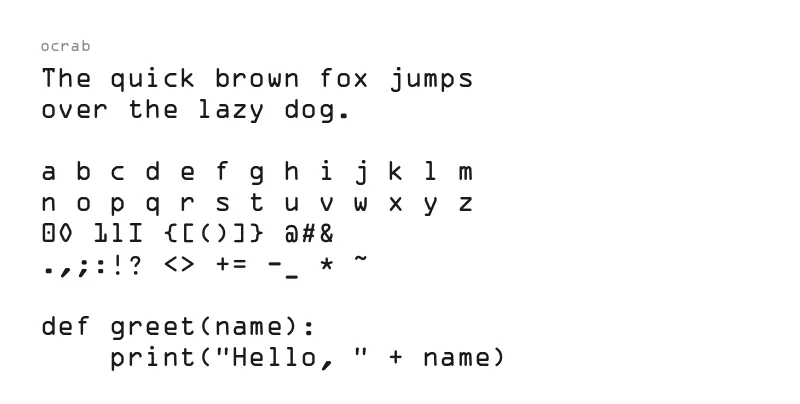
Recently I decided to stop searching and make something myself. The result is ocrab, a monospace font based on OCR-A and OCR-B.
The original OCR-A and OCR-B were designed in the 1960s and 1970s for optical character recognition, literally fonts meant to be read by machines. The versions used in ocrab come from Matthew Skala’s Tsukurimashou project, open source reimplementations of both standards. OCR-A is geometric and rigid, every stroke follows strict rules so that scanners can parse it reliably. OCR-B, originally designed by Adrian Frutiger, softened those constraints while remaining machine-readable, trading some of OCR-A’s robotic precision for better human legibility.
Both fonts have an unmistakable look. If you have ever seen the numbers on a passport or a bank check, you have seen OCR-B. They feel technical, industrial, purpose-built. Exactly the kind of personality I had been chasing. But beyond aesthetics, there is something appealing about using a font that was designed with readability as an engineering constraint, not just a goal.
The problem is that neither font works perfectly for coding on its own. OCR-B’s letterforms felt a bit off to me for programming, the characters are softer and rounder, designed for human readability on printed documents, but they lose the sharp, technical feel I was after. OCR-A on the other hand has exactly the right character, its letters are crisp and deliberate, but its symbols and punctuation are too abstract for my human eye, designed for scanners rather than programmers.
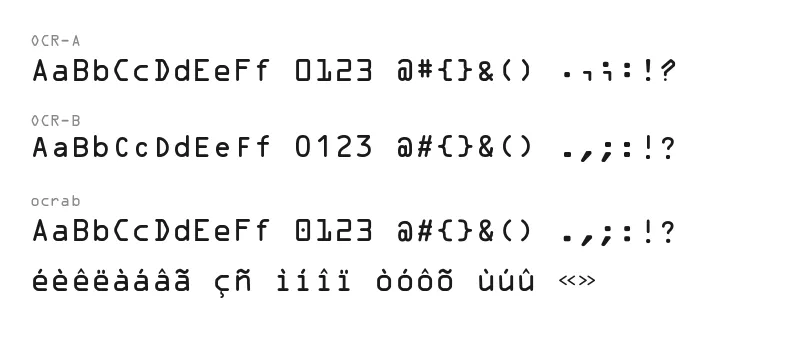
Mixing both turned out to be the best of both worlds. Ocrab uses OCR-A’s letters with OCR-B’s symbols and punctuation. Characters that OCR-A lacks are taken directly from OCR-B. For accented characters like é, è, ç, or ñ, the approach is to combine OCR-A base letters with OCR-B accent marks, built using FontForge. The result is a proper coding font with full ASCII coverage, accented characters for languages like French, and a Nerd Font patch for extra glyphs.
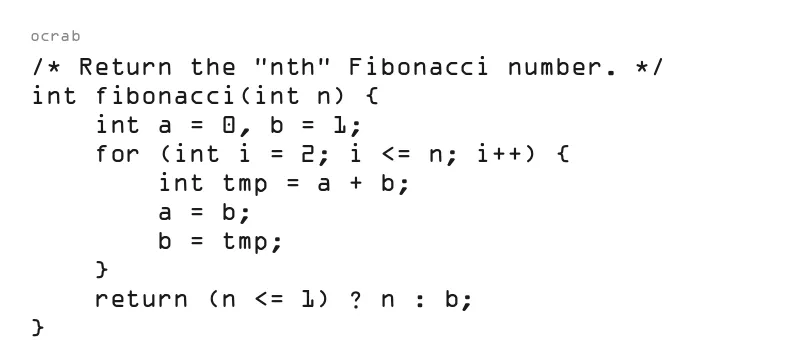
A font that looks like it belongs on a machine-readable document but works perfectly in a terminal and an editor.
What I like most about it is that it feels like a bitmap font without the downsides. The OCR heritage gives every glyph that crisp, intentional quality, each character looks like it was engineered rather than designed. But because it is a proper outline font, it scales cleanly to any size, works on HiDPI displays, and does not break when you need a character outside the basic set.
I have been using it daily for a few weeks now, in Emacs, in the terminal, everywhere. It feels right. After years of cycling through fonts, comparing, switching back, trying something new, this one has stuck in a way that feels different. It is not just that I like how it looks. It is that I put it together to match the exact criteria I have been refining for years: clean, readable, a little niche, with personality baked into every glyph.
It might be the end of the search. Or at least a long pause, before I inevitably circle back to Monaco again :)
~~~
Wrapping up
Looking back, the pattern is clear. I have always been drawn to fonts that feel intentional, fonts where someone made deliberate choices about how each character should look rather than optimizing for maximum neutrality.
The font you code in does not make you a better programmer. But it is one of the few aesthetic choices you get to make in an environment that is otherwise pure function. A good font makes the screen feel like yours.
The font samples in this post were generated with a small Python script using Pillow. For bitmap fonts like Greybeard and sq, Pillow can load BDF and PCF files natively and render them at their true pixel size. For outline fonts, it uses FreeType under the hood. The images are then converted to WebP with cwebp.
from PIL import Image, ImageDraw, ImageFont

SAMPLE = """\
The quick brown fox jumps
over the lazy dog.

a b c d e f g h i j k l m
n o p q r s t u v w x y z
0O 1lI {[()]} @#&
.,;:!? <> += -_ * ~

def greet(name):
    print("Hello, " + name)"""


LABEL_FONT = ImageFont.truetype("ocrab.otf", 14)


def render(font_path, label, output, size=24):
    font = ImageFont.truetype(font_path, size)
    tmp = Image.new("RGB", (1, 1))
    draw = ImageDraw.Draw(tmp)
    bbox = draw.textbbox((0, 0), SAMPLE, font=font)
    th = bbox[3] - bbox[1]
    pad, label_h = 40, 20
    h = label_h + th + pad * 2
    img = Image.new("RGB", (800, h), "#fff")
    draw = ImageDraw.Draw(img)
    draw.text(
        (pad, pad - 5), label,
        fill="#888", font=LABEL_FONT,
    )
    draw.text(
        (pad, pad + label_h), SAMPLE,
        fill="#1a1a1a", font=font,
    )
    img.save(output)


render("ocrab.otf", "ocrab", "ocrab.png")
render("MonacoB.otf", "Monaco", "monaco.png")Links
- ocrab, OCR-based monospace coding font
- Fantasque Sans Mono, a hand-drawn monospace typeface
- Triplicate, a typewriter-inspired coding font by Matthew Butterick
- Greybeard, a bitmap font for programmers
- sq, a tiny square bitmap font
- Luculent, a clean monospace with a rounded style