Sandboxing Claude Code with Docker
Introduction
Claude Code is an agent. It runs shell commands, edits files, installs packages, and generally does whatever it takes to complete a task. That is what makes it useful, and also what makes it uncomfortable: you are handing a tool arbitrary execution on your laptop.
Instead of running it directly on my machine, I run Claude Code inside a locked-down Docker container, driven by a bash script, claude-docker (27a2324):
cd my-project
claude-docker    # Claude runs, but only sees my-project
It is editor agnostic, just a shell script that works from any terminal, with optional Emacs integration on top. The image builds itself on first run, so there is no setup step. This post walks through how it works, the hardening decisions, and why I still use it now that Claude Code ships its own sandboxing.
I. Why sandbox at all
The sandbox flips the trade-off between power and trust:
- Blast radius = the project directory, nothing else
- No access to
~/.sshkeys, browser profiles, other repos, or system files - Safe to run with
--dangerously-skip-permissions, no constant “allow?” prompts, because the container is the permission boundary - Reproducible toolchain, every session gets the same git, go, python and node versions
The --dangerously-skip-permissions point is the real
motivation. Claude Code’s permission prompts exist because it runs on
your real machine. Move the boundary from the application to the OS, and
the prompts stop being necessary. Claude can run free inside the
container because the container cannot reach anything I care about.
II. How it works
Three pieces:
bin/claude-docker, the wrapper script, builds and runs the containerdocker/claude-sandbox/, a Dockerfile with the dev toolchain and Claude Codelisp/sw-claude.el, optional Emacs glue
The script mounts exactly what a session needs and nothing more:
-v "$PWD:$PWD"                     # the project, read-write
-v ~/.claude:/home/node/.claude    # config + auth persist across runs
-v ~/.gitconfig:...:ro             # git identity, read-only
# SSH agent socket forwarded: can push, keys never enter the containerWhat it does not get: everything else. The rest of my home directory simply does not exist inside the container. There is no deny list to maintain, the files are not hidden, they are absent.
When a task spans more than one repo, a backend and its frontend for
instance, extra directories can be let in explicitly. The script
intercepts Claude’s own --add-dir flag, mounts each
directory read-write at its host path, then forwards the flag on to
Claude with the resolved path:
cd backend
claude-docker --add-dir ../frontend
(A colon-separated CLAUDE_DOCKER_EXTRA_DIRS variable
does the same for directories a project always needs.) Extra directories
get their .env files shadowed exactly like the main
project, so widening the sandbox never widens which secrets it can
read.
One directory is let in automatically: ~/claude-shared,
mounted into every session when it exists. It is a scratch space shared
across all sessions, a place to drop a file for Claude to read, or for
one session to leave something another can pick up, without granting
access to anything else in the home directory.
a) Sessions are containers
Each run is a disposable container named after its project,
claude-myproject, so working on several projects at once
just means several containers side by side, each seeing only its own
directory. When launched from Emacs, the buffer name is appended too
(claude-myproject-2), so multiple sessions on the same
project get distinct containers. Killing a session removes the container
(--rm), nothing lingers.
b) Persisting config in a read-only home
One gotcha worth sharing if you build something similar. Claude Code
never updates its global config in place: it writes a sibling temp file
(~/.claude.json.tmp.<pid>, newer versions add a
random hex suffix), then renames it over the original. Bind-mounting
that file into the container, the obvious approach, defeats both steps.
The read-only home blocks the temp file, and even with a writable home,
the rename would fail, since a bind-mounted file is a mount point and
rename() cannot replace a mount point. Claude swallows the
error, so nothing visibly fails, the writes just vanish, and every
launch re-prompts for theme and folder trust.
The fix is to point CLAUDE_CONFIG_DIR at the mounted
~/.claude directory instead. There the config is a regular
file inside a writable mount, so atomic writes persist. The script seeds
it from the host’s ~/.claude.json on first use, so
onboarding, theme and account carry over.
III. Hardening the container
The container itself is stripped down:
--cap-drop=ALL                    # no Linux capabilities
--security-opt=no-new-privileges  # no setuid escalation
--read-only                       # immutable fs (sized tmpfs for /tmp, caches)
--pids-limit=512                  # no fork bombs
--memory=4g                       # no eating the host's RAM
--init                            # reap zombies (claude runs as PID 1)
--user "$(id -u):$(id -g)" # runs as you, not roota) Shadowing secrets
Project directories often contain .env files with real
credentials, and the project has to be mounted read-write. So the script
bind-mounts /dev/null over every .env file it
finds:
# .env files are bind-mounted over with /dev/null
-v "/dev/null:$PWD/.env:ro"The file exists in the project, but inside the container it reads as
empty. Template files, .env.example and friends, are left
readable: they exist to be read and hold no secrets. Claude can never
leak what it cannot see. This is a structural guarantee, not a policy:
there is no instruction to follow or ignore, the bytes are simply not
there.
b) Network egress filtering
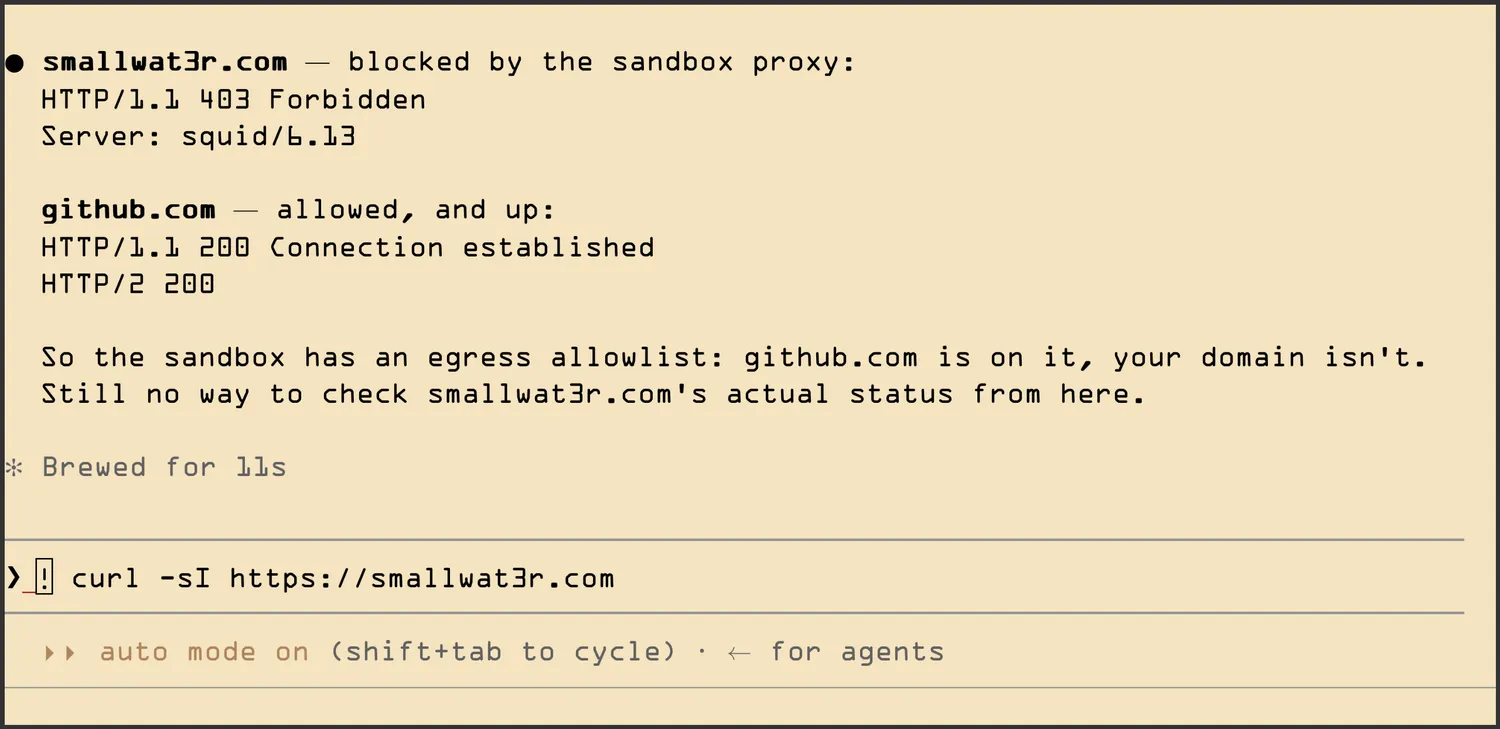
Egress is open by default, but can be locked down per session:
CLAUDE_DOCKER_NET_FILTER=1 claude-docker
The container then joins an internal Docker network with no route to
the internet. All traffic goes through a squid sidecar
that only allows domains listed in allowed-domains.txt
(Anthropic, GitHub, npm, PyPI, Go). Git-over-SSH tunnels through it as a
CONNECT to port 22:
GIT_SSH_COMMAND="ssh -o ProxyCommand=\"nc -X connect -x proxy:3128 %h %p\""Filtering is by domain name at CONNECT time, not by IP, so CDN churn does not break it. The squid config is a default-deny in a dozen lines:
acl allowed dstdomain "/etc/squid/allowed-domains.txt"
acl Safe_ports port 80 443 22
acl SSL_ports port 443 22
acl CONNECT method CONNECT

http_access deny !Safe_ports
http_access deny CONNECT !SSL_ports
http_access allow allowed
http_access deny all
DNS gets closed off too. Even with every connection blocked, merely
resolving a name leaks data: encode a secret into a hostname, look up
3xAB12EF.attacker.com, and the query itself carries the
secret to the attacker’s DNS server. The container does not actually
need DNS, though: it hands hostnames to squid as plain text in the
CONNECT request, and squid does the resolving. So filter mode points the
container’s DNS at a blackhole (--dns 127.0.0.1), and
external lookups simply die.
Here it is in action, asking Claude to check a domain that is not on the allowlist: squid returns 403 for it, while github.com goes through.
IV. Docker-in-Docker, safely
Claude often needs to inspect containers (logs, ps) when debugging.
Mounting /var/run/docker.sock into the sandbox would defeat
the whole exercise, the Docker daemon runs as root on the host, so
socket access is root on the host, game over.
Instead, a socket proxy (tecnativa/docker-socket-proxy) sits between them:
CONTAINERS=1  LOG=1  INFO=1    # read operations allowed
POST=0 EXEC=0 BUILD=0 # anything that mutates is refusedClaude can run docker ps and docker logs,
but a docker run -v /:/host escape attempt is rejected by
the proxy before it ever reaches the daemon.
From the host, each Claude session is just another container, named after its project:
$ docker ps
CONTAINER ID   IMAGE                           STATUS         NAMES
a1b2c3d4e5f6   claude-code-sandbox             Up 2 hours     claude-myproject
f6e5d4c3b2a1   claude-code-sandbox             Up 20 minutes  claude-otherproject
0b1c2d3e4f5a   tecnativa/docker-socket-proxy   Up 2 hours     claude-docker-proxy
7c8d9e0f1a2b   ubuntu/squid                    Up 20 minutes  claude-egress-proxy
9f8e7d6c5b4a   postgres:16                     Up 3 days      myapp-db
1a2b3c4d5e6f   myapp-api                       Restarting     myapp-api
The claude-egress-proxy squid sidecar only shows up when
a session has opted into the egress allowlist
(CLAUDE_DOCKER_NET_FILTER=1).
And from inside a session, Claude sees the same list through the proxy, so it can inspect its neighbours, read-only:
docker ps                    # what else is running?
docker logs myapp-api        # why is the api crash-looping?
docker inspect myapp-db      # what env / mounts / network is it on?
Typical use: my app runs with docker compose on the host, something breaks, I ask Claude “why does the api keep restarting?”. It pulls the logs and inspect output itself, but cannot exec into the container, restart it, or start anything new, the proxy refuses every mutating verb.
V. The image: a personal toolchain
The Dockerfile (27a2324) is
where the sandbox becomes yours. Base image node:22-slim,
then every tool I want Claude to have, chosen once and baked in:
git,gh,openssh-client, version control and GitHub CLIripgrep,fd-find,jq,tree, the search tools Claude reaches forgcc,g++,make,pkg-config, build essentialspython3withuv,mypy,ruff,pytest, the Python toolchain- Go, latest official tarball, apt’s version is outdated
docker-ce-cli, talks to the host via the socket proxyffmpeg,imagemagick,webp, media processingpandoc, document conversiongnuplot,openscad,admesh, plotting and 3D printing / CAD
The bottom half of that list is specific to my work, not a generic dev image. Your list would be different, and that is the point.
Adding a tool is one line in the Dockerfile plus a rebuild. Claude
never apt-installs anything onto my host, and a pip install
it runs on a whim dies with the container. The image is the only place
software accumulates, so the toolchain stays deliberate.
Claude Code itself is baked into the image the same way, pinned to an exact version with its auto-updater disabled. Updating Claude = bumping the version and rebuilding:
docker build --no-cache --build-arg HOST_HOME="$HOME" \
  -t claude-code-sandbox docker/claude-sandbox/
(Also available as sw-claude-rebuild-sandbox from
Emacs.)
The build pins what it can: the base image by digest,
uv, Go and Claude Code by version, with the Go tarball
checksum-verified. A rebuild cannot silently pull in something new,
updating is a deliberate version bump. (The apt packages stay unpinned,
Debian’s repos drop old versions, pinning those just breaks future
builds.)
a) The home directory symlink
A subtle detail that took a while to get right. The shared
~/.claude config stores absolute paths under the host home,
plugin install locations for instance, and those must resolve
identically inside the container. So the image symlinks the host home to
/home/node at build time, and the container runs with
HOME set to the host path:
ARG HOST_HOME=/home/node
LABEL host_home="${HOST_HOME}"
RUN if [ "$HOST_HOME" != /home/node ]; then \
    mkdir -p "$(dirname "$HOST_HOME")" \
    && ln -s /home/node "$HOST_HOME"; \
fiThe LABEL stamps which home the image was built for. On
launch, the script compares it against $HOME and rebuilds
when they differ. That catches a cached image built on another machine
(or for the default home): it lacks the symlink, and config and
credentials silently stop persisting.
VI. Why not the native sandbox
Claude Code now ships its own sandboxing, four options of increasing isolation:
- Built-in bash sandbox, bubblewrap (Linux) / Seatbelt (macOS), enabled per project with
/sandbox. Covers bash only - Sandbox runtime,
npx @anthropic-ai/sandbox-runtime claude, which wraps the whole Claude Code process, not just bash - Official devcontainer, a reference
.devcontainer/with a default-deny firewall - Claude on the web,
claude --cloud, Anthropic-managed VMs
So why keep a custom setup? The security models differ.
The native sandbox runs on your real filesystem and
subtracts access, deny lists you must configure and maintain.
~/.ssh and .env are readable by default.
claude-docker starts from an empty container and adds the
project directory. The rest of the machine does not exist inside.
Forgetting to configure something fails safe, not open.
What the custom setup still wins on:
- Secrets are structurally unreachable (
.envshadow, no home dir), not policy - A pinned, reproducible toolchain baked into the image
- Docker access mediated by a read-only socket proxy, not the raw daemon
- A real boundary for
--dangerously-skip-permissions: the built-in bash sandbox only covers bash, while file tools, MCP servers and hooks still run on the host
What the native options win on:
- No Docker required
- Deny-by-default networking, with a one-keypress prompt to allow a
new domain. Here egress is open unless you opt in, and an unlisted
domain just fails until you edit
allowed-domains.txtand relaunch - Credential masking. The native runtime hands the model a placeholder and its proxy swaps in the real key as the request leaves, so only the placeholder can leak. Here you would hand over the real key. Not a blocker yet, I do not let Claude call third-party APIs on its own anyway
a) The devcontainer comparison
The official devcontainer deserves its own comparison, it is the closest cousin: same idea, the container is the boundary and only the project is mounted. But they differ on almost every axis:
- Capabilities: the devcontainer runs with
--cap-add=NET_ADMIN,NET_RAWbecause its firewall is iptables inside the very container it polices. claude-docker runs--cap-drop=ALLand filters in a squid sidecar, outside the container. - Filesystem: writable in the devcontainer. Read-only here,
with
no-new-privilegeson top. - Network allowlist: the devcontainer resolves its allowlist to IPs once at startup, so CDN churn breaks allowed domains mid-session. Squid filters by domain name at CONNECT time, which is churn-proof.
- Secrets: the devcontainer mounts
.envas-is, the docs just advise not to mount secrets. claude-docker shadows them with/dev/null, structural rather than advisory. - Docker access: none at all in the devcontainer. Here, the read-only socket proxy.
- Portability: a devcontainer does not run itself, it needs
spec-aware tooling to launch it (VS Code, Codespaces, JetBrains, the
devcontainerCLI). claude-docker is one bash script, any terminal, any editor.
In short: the devcontainer trades hardening for convenience and editor integration, claude-docker is stricter on every axis at the cost of being nobody’s standard.
VII. Emacs integration
Since this lives in my Emacs
config, there is a thin layer of glue. claude-code.el simply points at the wrapper script
instead of the claude binary:
(defconst sw-claude-docker-script
  (expand-file-name "bin/claude-docker" user-emacs-directory)
  "Path to the Docker wrapper script for sandboxed Claude.")

(use-package claude-code
  :when (and (executable-find "docker")
             (file-executable-p sw-claude-docker-script))
  :init
  (setq claude-code-program sw-claude-docker-script
        claude-code-program-switches
        '("--dangerously-skip-permissions")
claude-code-terminal-backend 'eat))Because the script is editor agnostic, the Emacs layer stays tiny: a rebuild command, desktop notifications, and window placement. Nothing in the sandbox knows or cares that Emacs is on the other end.
VIII. What this does not protect against
No sandbox makes --dangerously-skip-permissions safe
against a malicious project. Anything readable inside the container can
be exfiltrated by a prompt-injected session, and that includes the
Claude Code credentials: the OAuth token lives in the mounted
~/.claude. Worth spelling out:
- The egress allowlist bounds exfiltration, it does not prevent it. GitHub, npm and PyPI are all viable exfiltration channels for anything the session can read.
- Without the egress filter, the container sits on an ordinary bridge network, so the host’s own services and the rest of the LAN are reachable.
- The Docker socket proxy is read-only, but read-only visibility is
still visibility:
docker inspectreturns the full environment of every container on the host, secrets included. On a dev machine those are usually throwaway values, but so are the.envfiles this setup bothers to shadow, treat them with the same suspicion. ~/.claudeis mounted read-write and shared across sessions, so a compromised session could read another project’s transcripts, or plant hooks and instructions that run in future containers. The seam stays inside the sandbox boundary, but it crosses projects.- The forwarded SSH agent cannot leak keys, but it will sign for anything in the container while a session runs.
Use this with repositories you trust, keep an eye on what Claude does, and prefer repository-scoped or short-lived tokens over long-lived host credentials.
A personal habit on top, not enforced by anything in the setup: I do not let Claude write to third parties. No pushing, no publishing, no POSTs to external services, and I always commit manually. The session produces the diff, I review it and commit it myself. It costs a manual step per change, but it means nothing leaves my machine without my eyes on it first, and it keeps write credentials out of the container entirely.
A side effect is that the sandbox rarely needs API keys or tokens at all: an agent that never writes outward has little use for credentials. When it needs to read something from a third party, a read-only token is enough, or I just fetch the data myself and feed it in.
~~~
Wrapping up
If you are thinking about using a similar setup, here is what I learnt building this one:
- Enforce permissions with walls, not prompts. Decide once what the container can see and reach, then let Claude run free inside it.
- It does not take much, ~300 lines of bash, no framework, portable to any editor.
- Prefer absence over policy. A secret that is not in the container cannot leak, an instruction not to read it can be ignored. Guarantees beat trust.
The native sandboxing options are improving fast, and for most people they are the right default. But this setup is mine in the same way my Emacs config is mine: I decide what the boundary is, what tools go in the image, and what leaves the network. Every rule is a line of bash I wrote and can read, not a policy I have to trust. That control is worth more to me than being on the standard path.
Links
- claude-docker (27a2324), the wrapper script
- The sandbox Dockerfile, image, squid config and domain allowlist
- claude-code.el, the Emacs package the integration builds on
- docker-socket-proxy, the Docker API filtering proxy, configured read-only here
- Claude Code sandboxing docs, the native alternatives